Appearance
Competitor Live Stream Monitoring
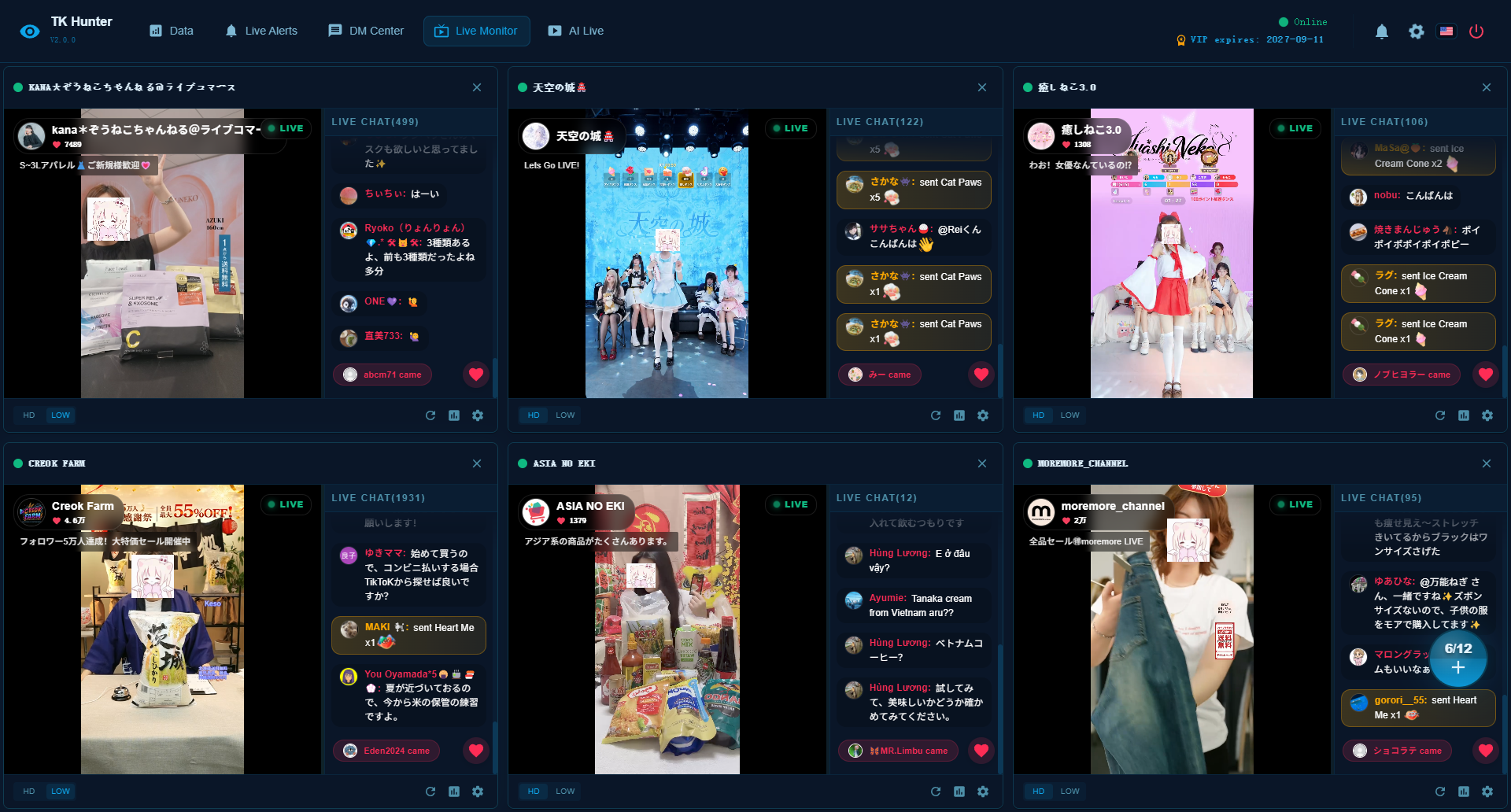
Real-time monitoring of peer or competitor live streams is one of the core features of the TK Hunter system. It helps you lock down active, high-intent users interested in related products in the shortest time possible.
📷 UI Screenshot
Key Features & Capabilities
1. Multi-Stream Parallel Monitoring (Up to 12 Streams)
TK Hunter supports monitoring up to 12 TikTok live streams simultaneously, ideal for multi-competitor parallel analysis.
- Multi-account / multi-stream parallel execution
- Independent task isolation to prevent cross-interference
- Supports batch addition and management of live streams
👉 Helps you upgrade from "single-point observation" to an "industry-level monitoring perspective"
2. Flexible Data Listening Configuration
Each live stream can be configured with its own listening strategy:
- Specify monitored user behaviors (Comments / Likes / Gifts)
- Adjust data update frequency and intensity
- Apply data filtering rules to filter out noise
👉 Adopt different strategy models for different streams to adapt to various competitor styles
3. Multi-Dimensional User Behavior Capture
The system automatically captures critical audience actions inside the live streams:
- Commenters: Active purchase intent expression
- Likers: Low-barrier interest signals
- Gifters: High-intent, high-value monetization signals
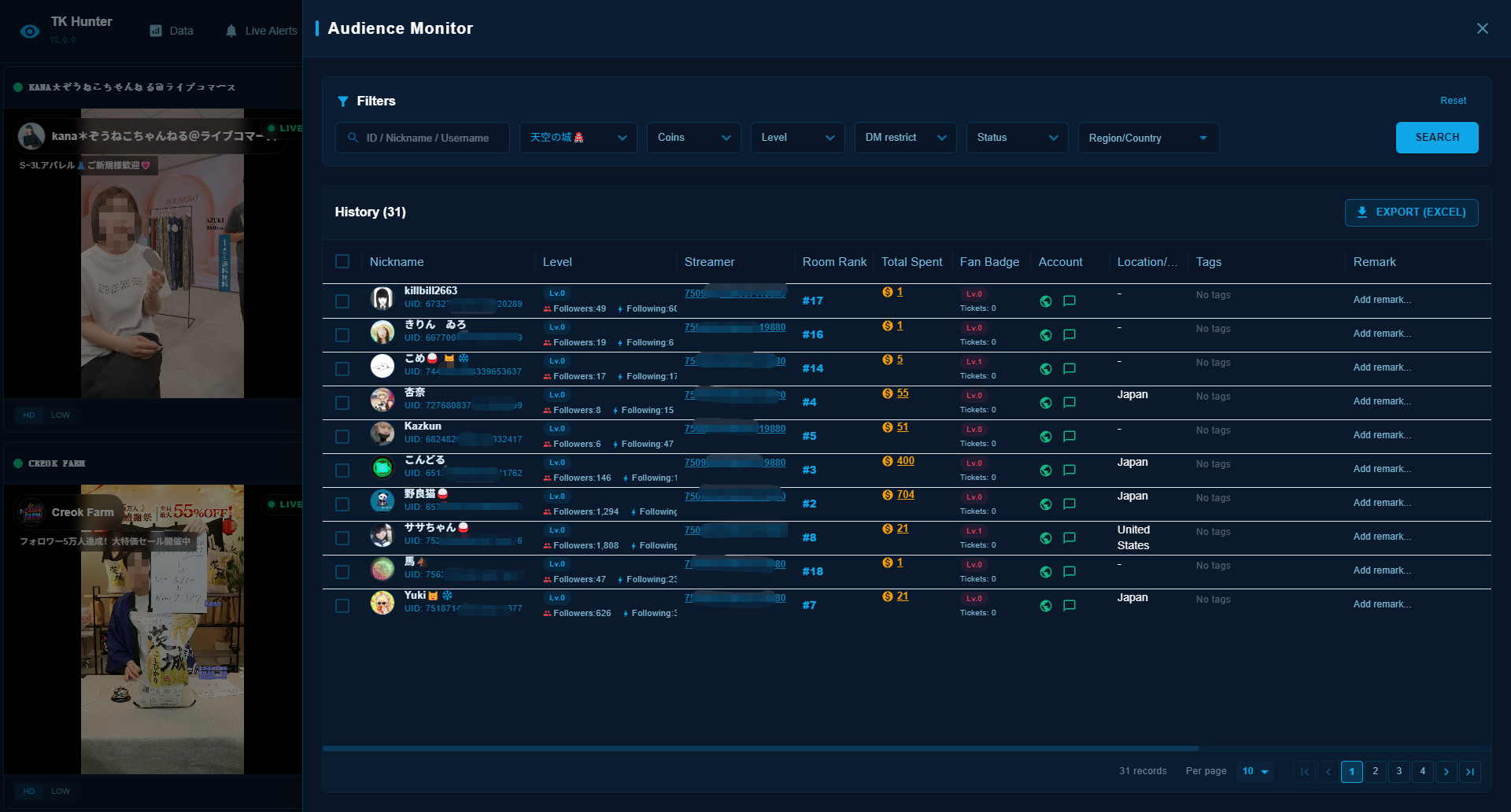
All captured leads are unified into a centralized local lead pool for subsequent conversion.
👉 Essentially transforming "live stream traffic" into "actionable customer assets"
4. AI Intent Recognition & Semantic Analysis
Powered by industry-specific script models and AI semantic analysis, the system automatically detects high-quality leads:
- Identify commenter intent (Inquiry / Purchase / Comparison)
- Determine customer purchase stage (Interest / Consideration / Decision)
- Filter out invalid interactions (spamming, irrelevant comments)
You can customize exclusive script models for different industries, such as:
- Beauty & Cosmetics
- Cross-border E-commerce
- Courses & Education
- Local Services
👉 Upgrade from "finding people" to "finding the right people"
5. Real-Time Data Stream & Behavioral Tracking
All audience behaviors are updated dynamically in real-time during the broadcast:
- Who just became highly active
- Who repeated interactions
- Who stayed the longest
Enables continuous tracking of user engagement trends rather than static data exports.
6. Structured Live Data Accumulation
All monitored results are structured and stored automatically:
- User behavioral tags
- Source live stream details
- Interaction timeline
- Purchase intent score
Perfect for subsequent actions:
- Automated DMs
- Lead categorization
- Conversion follow-ups
Quick Summary
Monitor up to 12 competitor live streams simultaneously. Combined with audience behavior tracking and AI semantic analysis, it automatically identifies high-intent customers, converting live stream traffic into actionable customer assets.
📷 Monitored Leads List Screenshot
How to Get Started
- Log in to the TK Hunter client and open the "Live Monitor" page.
- Click the "Add" button on the task dashboard to create a new monitor task.
- Enter the target competitor's TikTok live stream URL or Host UniqueId.
- Configure precise filtering rules: set up industry script semantic matching rules (e.g. only capture comments containing keywords like "price" or "buy"), decide whether to enable like detection, and set gift coin ranges.
- Click "Start Monitor" to launch the task. The system will start background real-time data monitoring.
- Click the "Data" icon button at the bottom-right corner of the monitor screen to view and filter captured intent user data in real-time.